The round trip
Your data → your AI or ours → your board, hosted by GRIDINT → export whenever you want. The instruction file is the entire integration — one generated file your AI reads, a contract you can read end to end — and everything below is how it ran in the first live sessions on the bring-your-own-AI path (the instruction file calls it tier-3), not how we hope it will.
Three things hold for every record, wherever it lives:
- it has an address — a cell on a lattice, so it can be placed, found and commanded by name;
- its provenance travels with it — who or what wrote it, from what source, when;
- the record is the truth and the layout is not — what you see is derived from it, never the other way round.
The five steps below are that discipline on the board — Grid Space, as it ran in the first live sessions.
Your space, hosted
Plain JSON records in a space we host for you — small and boring on purpose, and yours to export in full.
A Grid Space is plain JSON records, hosted by GRIDINT and belonging to you. The tree is small and boring on purpose — and it is exactly what an export hands you:
spaces/<space-name>/
  space.json            ← the index
  sheets/<sheet>.json   ← one file per sheet; records live in its items array
data/                   ← your datasets (CSV and friends)
.gridint/format         ← the format marker
INSTRUCTIONS-GENERATED.md
the seed tree, exactly as a space starts — and the shape a self-hosted enterprise repo carries
Your AI reads one generated file
Machine-generated from the same records that drive the board — the doc and the door cannot drift.
The instruction file is machine-generated from the same records that drive the board — the element library, the record schemas, and the gate's own refusal table are extracted at generation time, so the documentation cannot drift from the door. It carries a version; every record your AI writes stamps that version into its provenance. This is the file's own head, verbatim:
# GRIDINT · TIER-3 INSTRUCTIONS (GENERATED)

instructions_version: gen2-374d98de
records_as_of: 2026-08-15
generated_by: gridint-instructions-gen/generate.mjs
sources:
  - shelf-drafts-52.js (52 records, asOf 2026-08-15)
  - shelf-drafts-media-5.js (5 records, asOf 2026-08-15)
  - shelf-drafts-text-3.js (3 records, asOf 2026-08-15)
  - shelf-drafts-layouts-20.js (20 records, asOf 2026-08-15)
  - shelf-drafts-ct-extras.js (35 records, asOf 2026-08-15)
  - port/seam.js SHAPES (mined read-only)
  - port/shelf-manifest.js recordShape lines (mined read-only)
  - port/place-gate.js (refusal table PROBED from the live door)

> GENERATED FILE — never hand-edit. A change to an element is a
> record edit; rerun generate.mjs and this file re-renders. The
> refusal table below was extracted by driving probe records
> through the real placement gate at generation time — doc and
> door cannot drift.
the real artifact, excerpted verbatim with its version stamp — every record an AI writes carries origin.by.instructions = "gen2-374d98de"
It also states, plainly, what the record discipline asks of a model — match your own tool against it:
| REQUIREMENT | WHY THE DISCIPLINE NEEDS IT |
|---|---|
| Long context | The instruction file, the sheet's existing records and your data must all fit in one working view — the model edits a board, not a snippet. |
| Reliable structured output | Records are flat JSON appended to an items array; a model that drifts from the shape meets the gate's refusals. |
| Instruction-following under a schema | The file is law: addresses, birth fields and provenance are required, and the model must keep obeying them deep into a session. |
Any model that can hold those three holds the discipline. The placement gate judges the records, not the logo on the model.
Records append; a gate judges every one
Flat JSON in, validated whole-or-refused — and a refusal is instructions, not an error page.
Your AI appends flat JSON records to a sheet's items array and saves — on the self-hosted tier, that save is a commit and a push. This is what one looks like — exactly as an AI wrote it:
{
  "ref": "el-r1-revenue",
  "type": "chart", "kind": "bar",
  "cargo": { "binding": { "record": "el-r1-data" } },
  "cache": { "series": [4.2, 5.1, 6.4, 8.0],
             "labels": ["Q1","Q2","Q3","Q4"] },
  "px": { "x": 480, "y": 216, "w": 384, "h": 240 }
}
a real record from the first live run — it landed through the gate, bound to its dataWhen the board syncs, every arriving record is validated whole-or-refused at the placement gate — and a refusal is not an error page, it is instructions:
🔴 REFUSED · E-PROVENANCE · el-q-revenue
   this record asserts a number with no source behind it
   fix: bind it: cargo.binding.record = the ref of
        the data record it derives from
a real refusal, verbatim from the gate — the first live AI fixed its batch from this text alone, no human in the loop
One bad record never blocks its valid siblings. The fix lands through the same door.
The board renders — readable, sourced
Addressed faces derived from their data — nothing arrives without a source.
Valid records appear on the board, addressed, their faces derived from their data. A chart that cannot be read is not a chart here: axes, labels and gridlines are law. Nothing arrives without a source — the board holds evidence, not decoration.
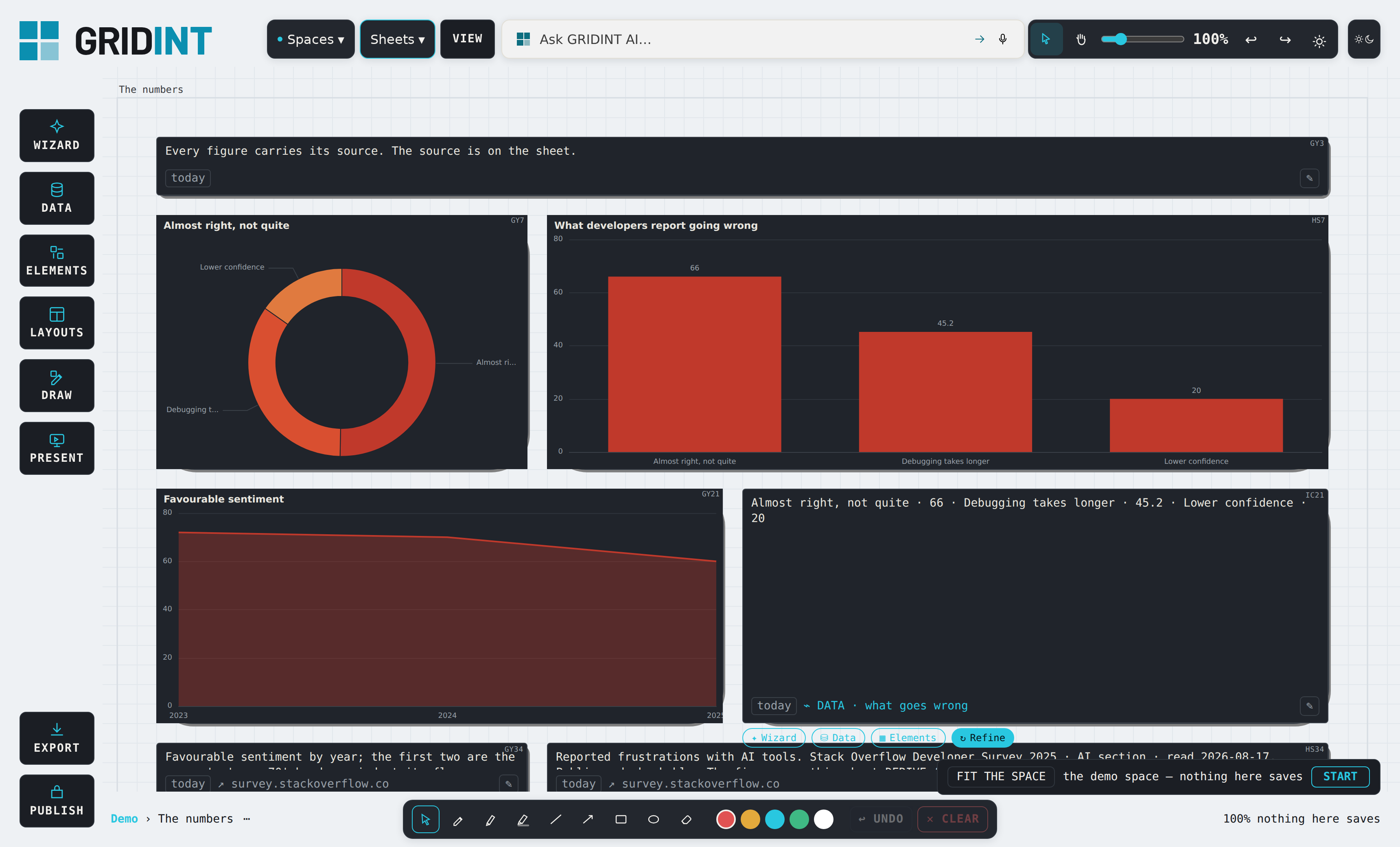
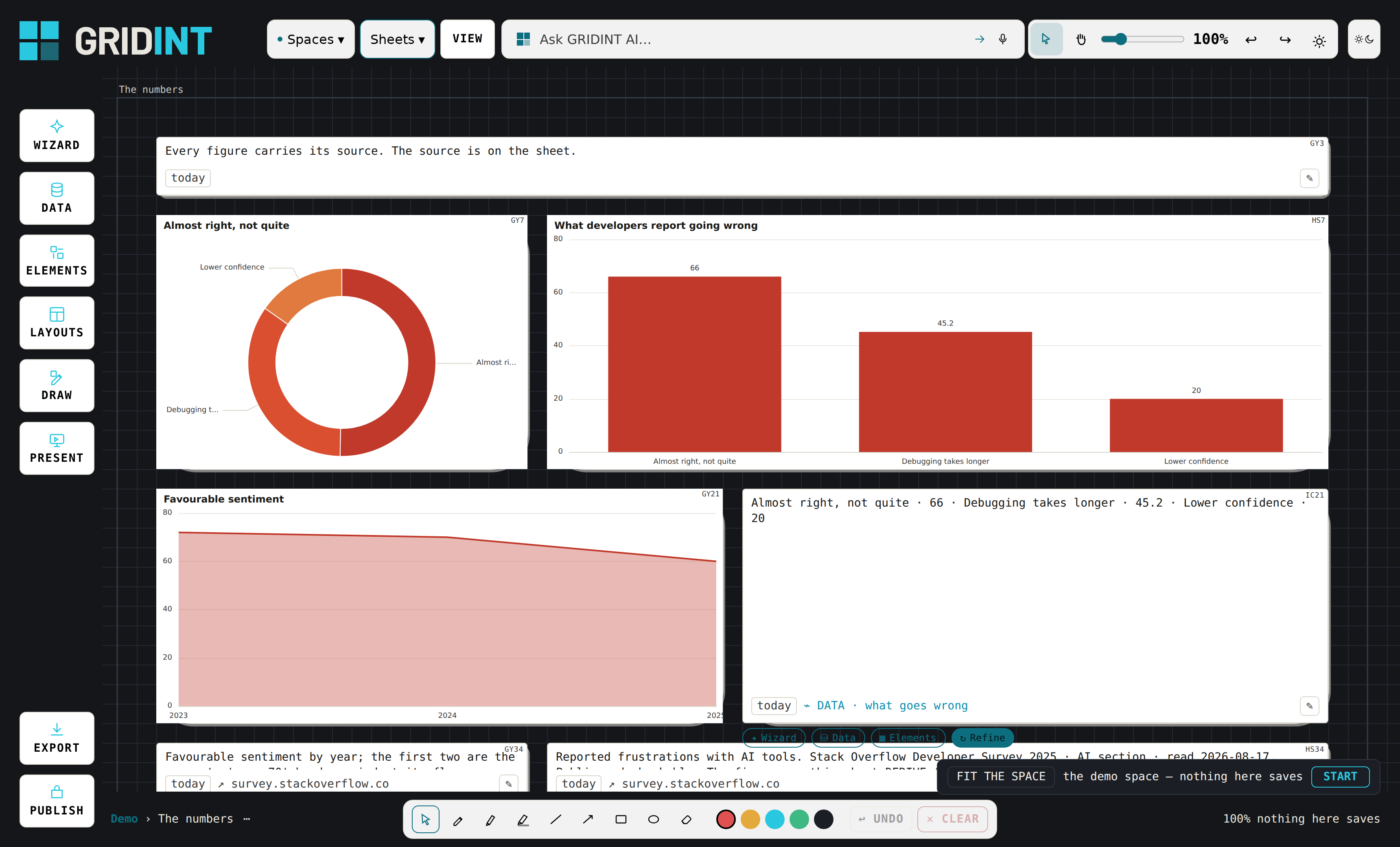
the sheet the chart below comes from: the figures, and beside them the source cards they are bound to — survey.stackoverflow.co, read 2026-08-17
It persists — and exports whenever you want
Persistence is GRIDINT's job; the export is the whole space, plain JSON, in full.
Close the lid; the work waits — persistence is GRIDINT's job, and the board's history is kept. On the self-hosted enterprise tier that history is a git log in a repository you run:
$ git log --oneline
e119dbd Bind revenue chart to companion
        data record per provenance rule
eec0318 Add Q1-Q4 revenue bar chart
        from finance.csv
real history from the first bring-your-own-AI run — on the self-hosted tier, the board's version history is a git log you own
And the reverse path is a convention your AI already knows: revision requests queue in the space, get processed exactly once, and move to done/ with a result stamp. Running the AI twice changes nothing the second time.
Where the work lives — and how it leaves
Hosted, the work lives with GRIDINT: you see "saved," and it is saved — and the export is always the whole space, plain JSON, yours. On the self-hosted enterprise tier, git is the substrate: the same "saved," and underneath it an honest commit in a repository you run. Where that repo lives is yours:
THE FLOOR
A repo in your browser's own filesystem
No account, no prompt, no decision.
AN UPGRADE
A folder you can see
Not the price of entry.
GITHUB, GUIDED
We create the repo inside your account
Off-machine durability, multi-device — and repos we create are private, structurally; the button that could expose your work is one we refuse to own.
ANY REMOTE
A git URL · a bare repo on your NAS
Self-hosted, university, corporate.
A BILL YOU ALREADY PAY
The repo folder inside Dropbox / iCloud / OneDrive / Syncthing
Multi-device without learning git.
the self-hosted tier's five homes — on that tier, wherever the repo lives, it is yours
And on that tier, when git reaches a state an ordinary person cannot leave, the button is one and its label is not a git word: "Get me back to work." It parks everything first so nothing is lost, returns you to the last good state, and says plainly where the parked work went. And conflicts resolve by placement, not by picking a loser — the board is infinite, so two versions sit side by side and a person looks at them.
The first three minutes
Grid Space teaches by being used, never by a tour — every lesson is a working card you can keep or delete. You arrive on a furnished welcome sheet: a note card explaining what a card is, in one sentence, on an actual card; a live claim card reading a real record from the spine, proving nothing here is a demo; a reminder card set to remove itself tomorrow — watch me leave; nothing here rots. Your first placement teaches the deepest law by feel: the element rides your cursor, and nothing lands without your hand. On day two the reminder is gone, exactly as it said, and the fed cards refreshed while you were away — the board did work without you, which is the whole point of a board that persists.
watch me leave —
nothing here rots
hand · removes itself tomorrow
New to the IDE side?
The hosted AI tier carries you without an IDE at all. If you want the AI+ path, the bridge is smaller than it looks: an AI-capable editor (Claude Code, Cursor, Windsurf, VS Code with an agent) pointed at your space gives you faster product research, structured output instead of prose, and data that survives into your technical tool. What it costs: you already pay for your AI — we do not resell it — plus a learning curve we teach rather than assume. What it does not do: flip a switch that grants capabilities by magic — it amplifies a workflow you already have.